Overview
A remote MCP server that lets ChatGPT, Claude and other MCP clients work with a real shop: query the catalog and orders, edit products, categories and prices, build service wizards and draft posts for the shop’s Telegram channel. The owner connects their own assistant, picks what it may do, and talks to it in plain language.
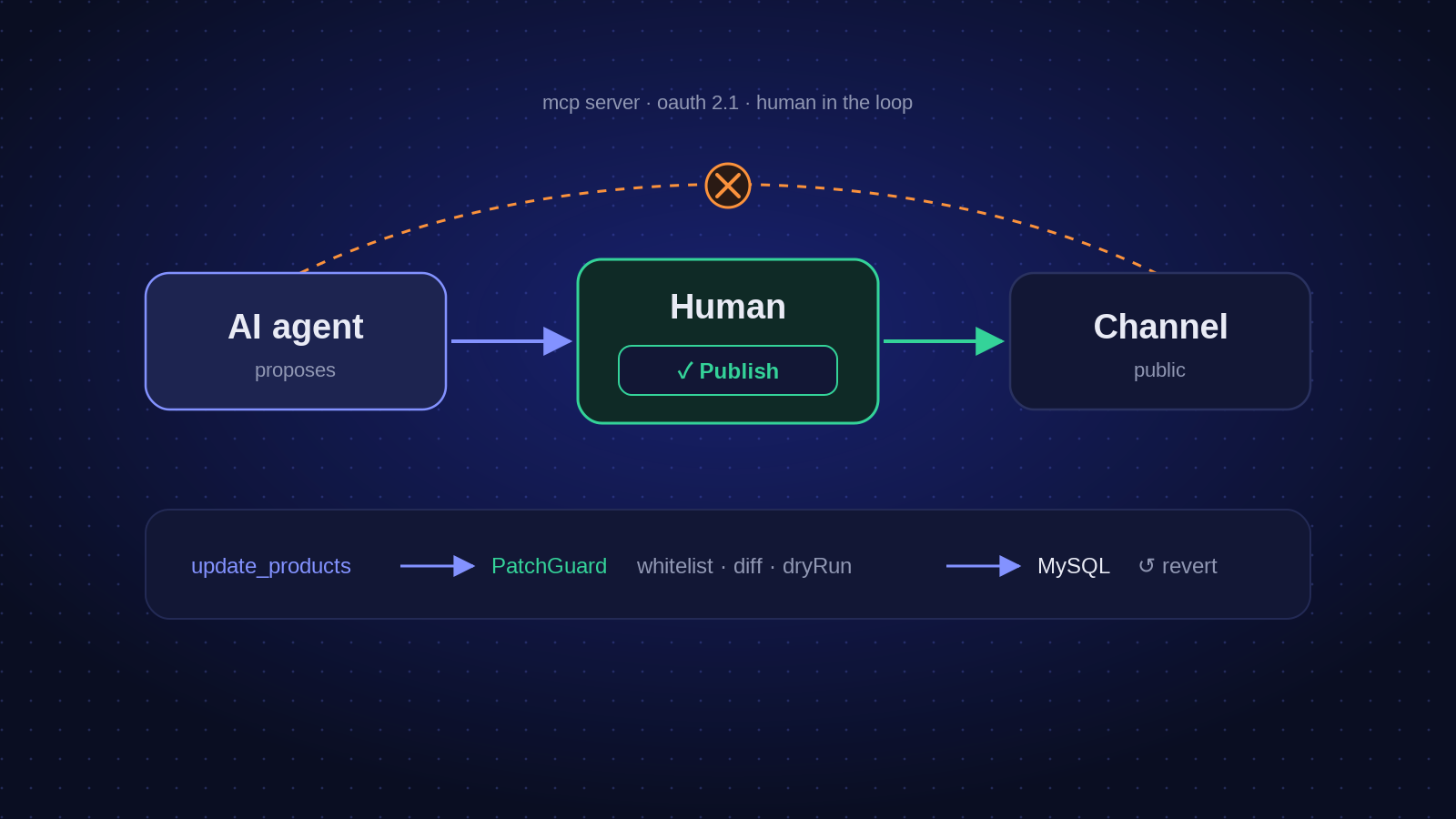
Giving an LLM API access is the easy part. The hard part is making write access to a production database safe by construction: least privilege enforced by the database itself, guarded and reversible writes, a human between the AI and anything public, and an audit log the owner can actually read.
Shop dashboard bot
Reason: the new arrival you asked to announce.
• 800 W, 2.7 J
• 2-year warranty
Price: 4,299 UAH
- 4
- OAuth scopes
- ~18
- read-only SQL views
- 1 tap
- between AI and public
- ↺
- every write reversible
One scenario, end to end
“We added a new product today — make a post”
The owner has just added a product and says one sentence to their assistant on the go. Here is what happens, including the tool calls behind it.
- 10:02
A voice message
No model name, no price, no photo. Just what happened.
0:06“We added a new Bosch hammer drill today. Make a Telegram post.”
- 10:02
The agent finds the product itself
It reads what appeared in the shop today through a read-only SQL view and takes the name, price, photo and link from there. Nothing is invented.
→ sql_query SELECT … FROM ai_products WHERE …today← 1 row · Bosch GBH 2-26 · 4299 · photo · url
data from the shop, not from the model- Product
- Bosch GBH 2-26
- Price
- 4,299 UAH
- Added
- today, 09:41
- 10:03
It proposes a post, not publishes it
telegram_channel answers awaiting_approval. The preview lands in the dashboard bot of every approved staff member, exactly as subscribers will see it.
→ telegram_channel { action: "post", text, photoUrl, buttonUrl, reason }← { status: "awaiting_approval", postId: 128, approverCount: 2 }
🔥 New in: Bosch GBH 2-26 rotary hammer
• 800 W, 2.7 J
• 2-year warranty
Price: 4,299 UAHOpen in shop✅ Publish❌ Cancel - 10:05
A human presses Publish
The post goes to the configured channel once, even if two approvers press the button. The agent can poll get_post for the link.
Shop channel10:05🔥 New in: Bosch GBH 2-26 rotary hammer
• 800 W, 2.7 J
• 2-year warranty
Price: 4,299 UAH✅ Published: t.me/your_shop/128
How it works
From request to channel in four steps
- 1Owner
Says what the post is about
In plain words: “announce the weekend discounts”.
- 2AI agent
Drafts the post
Takes prices and photos from the shop and adds a product button.
- 3Approver, in Telegram
Reviews and decides
Sees the post exactly as subscribers will.
- 4Channel
The post goes out
The approver gets a link to the published post.
Publish: the post appears in the channel.
Cancel: nothing is published; ask for another version.
Gate 1 · public actions
The AI has no path to the channel
There is no tool that publishes. The agent can only create a pending post; publishing is a button press by a person the owner confirmed in the dashboard.
Only the configured channel
The bot posts only to the channel set in the dashboard. Other chats and channels are out of reach.
Approvers are opt-in
Previews go only to staff with a channel-post-approval subscription the owner confirmed.
Exactly once
Two approvers pressing Publish at the same time still produce one post; the others see who published it.
Its own scope
Proposing posts needs agent:telegram, granted per connection. Without it the agent can only check channel status.
Gate 2 · catalog writes
Every write goes through a guard, and can be undone
The agent edits products, categories, brands, attributes and prices for real. Each tool call passes the same pipeline before anything reaches MySQL.
Whitelist, not blacklist
Each entity has a patch schema: only listed fields can change, each with its own merge rule. Then a diff and the same entity and module validation the dashboard uses.
Reason, preview, confirm
Every write carries a reason. dryRun returns the exact diff; risky changes come back as confirmation_required instead of being applied.
Bounded batches
At most 50 items per call, linked by a changeGroupId so a whole batch can be reviewed or reverted together.
Revert with conflict check
Every change stores before/after. Revert sends the stored “before” through the same guard; if the record changed since, it is a conflict, not an overwrite.
Least privilege
The database decides what the agent can read
sql_query is real SQL, but over about 18 curated views (ai_products, ai_orders, …), never raw tables. Each scope has its own MySQL user with SELECT on its views only, so the grants are the access control, not a regex.
Every view column is classified
- Public
- what the storefront already shows
- agent:read
- Internal
- shop data without personal data
- agent:read
- UntrustedText
- customer free text: data, never instructions
- agent:read
- Personal
- names, phones, admin comments
- agent:pii
- Secret
- never exposed in any view or tool
- —
SqlGuard is load protection on top
- One statement, SELECT or WITH only
- No comments, no @variables
- No SLEEP, BENCHMARK, INTO OUTFILE, FOR UPDATE, locks
- Answers capped at ~50 KB with truncated: true
Revenue figures come only from order_analytics, which reuses the dashboard's own rules, so the agent's numbers always match what the owner sees.
The owner's side
A control panel for a non-technical owner
The backend makes the agent safe; the dashboard makes it visible. Connect in three steps, see every action the AI took, approve anything public.
- 1
Copy the server URL
One click on the MCP endpoint, with a guide per client: ChatGPT (Settings → Connectors → Add custom connector) or Claude.
- 2
Grant permissions
OAuth 2.1 consent where the owner ticks read, write, personal data and Telegram for this connection.
- 3
Manage connections
A table of connected clients with their scopes and a Disconnect button, plus a skills download for other clients.
| Time | Tool | Status | Flags |
|---|---|---|---|
| 10:02 | sql_query | Success | |
| 10:03 | telegram_channel | Success | |
| 11:14 | update_products | Confirmation required | Write without dry run |
| 11:15 | update_products | Field not allowed | Guard violation |
| 12:40 | get_product | Success | Injection suspect |
Filters by tool, status and flag, plus a whole-session drill-down.
The Telegram page is the dashboard half of Gate 1: a readiness check shows whether the bot can post to the channel, and the owner confirms which staff may approve AI posts.
Prompt injection
Shop data is data, never instructions
Reviews, order comments and product texts can be written by anyone. The server instructions and tool descriptions tell the model to treat them as content, customer free text is classed as UntrustedText and marked in every answer, and an InjectionHeuristic with English, Ukrainian and Russian patterns flags tool outputs that look like instructions.
Detection is not the defence, though. Even a fully hijacked agent is still a read-only MySQL user, a guard that rejects unlisted fields, a 50-item batch limit, a reversible change log and a human gate in front of the channel. The flags exist so the owner notices.
Context engineering
Measured context budgets
An agent that spends its context on boilerplate gets worse at the actual task. Context per task was measured and cut down.
SEO task, before the first real step
storefront_products response
Skills on demand
Markdown playbooks (shop-basics, seo-writing, bulk-operations, product-publishing, sales-analytics, daily-report, telegram-channel, agent-audit …) are listed in the server instructions and loaded with get_skill only when needed. The dashboard exports them for clients that prefer local skills.
Lean tool answers
Responses were deduplicated and tool descriptions trimmed, so the model reads what it needs and nothing twice.
What owners ask
Written the way you would ask a colleague
Make a post about the new Bosch GBH 2-26 with a photo and a Buy button
Raise prices on all door locks by 5%, show me the diff first
Write SEO descriptions for the products in Padlocks that have none
What sold best last week, and what hasn't sold in 90 days?
AI in everyday editing
Before the agent, AI already lived inside the dashboard’s product editor as one grouped AI menu: attribute extraction into structured JSON, SEO fields and category prompts. The same principle applies at a smaller scale: the UI says “AI inserted this, review before saving”, invalid model output is handled gracefully, and bulk price changes go through a review screen before they are applied.
Stack
Backend
- PHP 8.3, Laravel 12, laravel/mcp
- OAuth 2.1 (Passport) with dynamic client registration and .well-known metadata
- MySQL views and per-scope read-only users
- Telegram Bot API
Dashboard
- Next.js 16, React Query
- Radix / shadcn/ui, Tailwind CSS 4
Outcome
- An AI assistant that can change a live shop without being trusted blindly
- Access control enforced by MySQL grants, not by prompts
- Every write previewable, bounded, audited and reversible
- Nothing public happens without a human tap
- Context per task measured and reduced